


Why Your Ecommerce Profit Calculator Is the Most Important Tool You’re Not Using
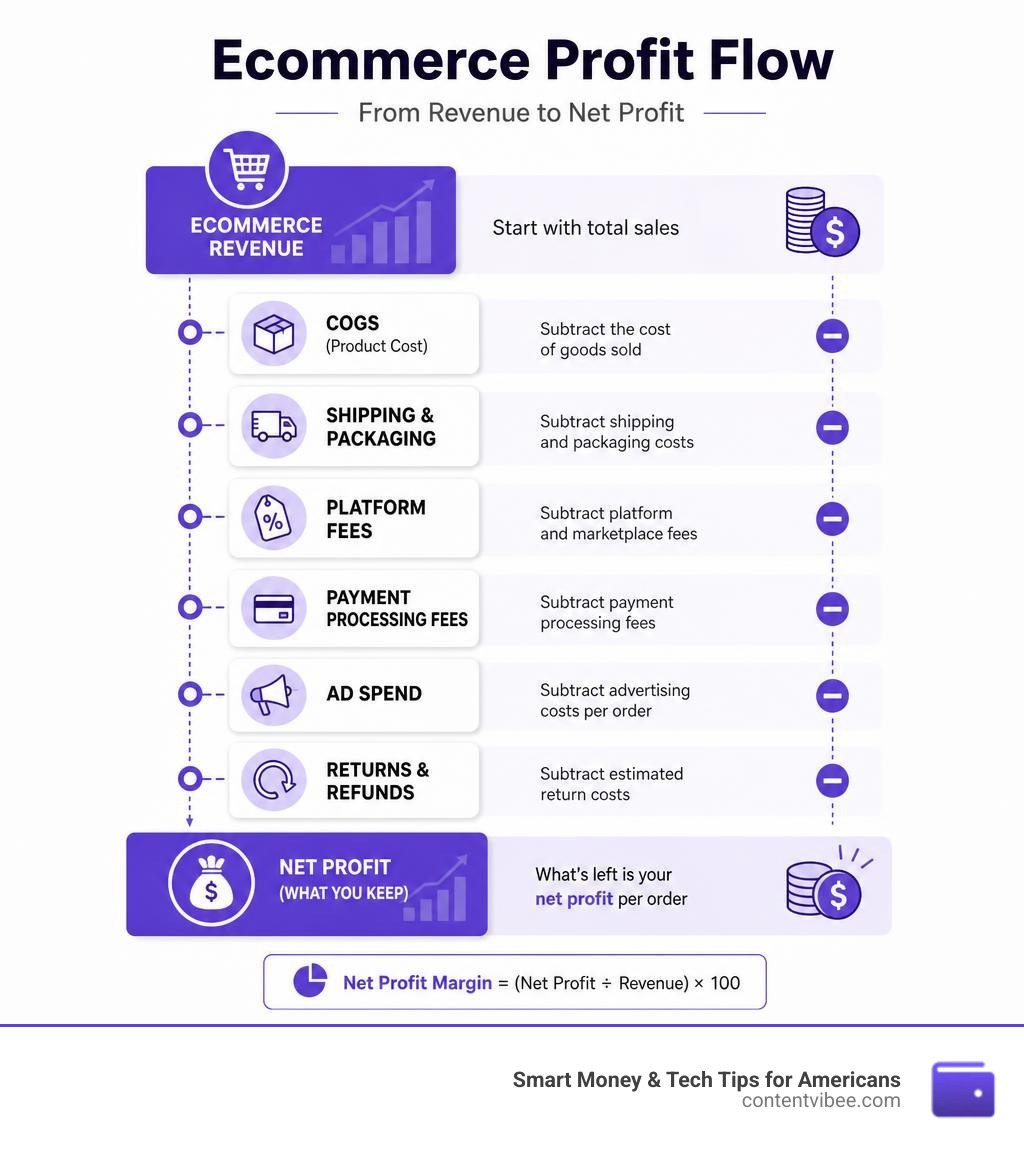
An ecommerce profit calculator takes your selling price and subtracts every cost — product, shipping, platform fees, ads, and returns — to show your true profit per order.
Quick answer: How to calculate ecommerce profit
| Step | What to do |
|---|---|
| 1 | Start with your selling price |
| 2 | Subtract product cost (COGS) |
| 3 | Subtract shipping and packaging |
| 4 | Subtract platform fees (Amazon, Etsy, Shopify) |
| 5 | Subtract payment processing fees (~2.9% + $0.30) |
| 6 | Subtract ad spend per order |
| 7 | Subtract estimated return costs |
| Result | Your net profit per order |
Net Profit Margin = (Net Profit ÷ Selling Price) × 100
A healthy ecommerce net margin is 10–20% for most stores, with top performers hitting 20%+.
Here’s the problem most online sellers run into: revenue looks great, but the money just isn’t there at the end of the month. That’s because revenue doesn’t equal profit. Platform fees, ad costs, and returns quietly eat into every order. One source put it simply — many ecommerce businesses appear profitable on revenue but are actually losing money per order once all the hidden costs are counted.
This guide walks you through exactly how to use a profit calculator, what costs to include, and what margin numbers to aim for in your niche.
What is an Ecommerce Profit Calculator and How Does It Work?
At its core, an ecommerce profit calculator is a digital tool designed to help online store owners look past vanity metrics like gross revenue and focus on what they actually keep. Many new sellers get excited when they see thousands of dollars flowing through their dashboards, but without clear revenue visibility, they might actually be scaling a business that loses money with every transaction.
An online profit calculator works by taking your base selling price and systematically subtracting all operational costs. While you can build a manual spreadsheet to track these figures, manual entry is often prone to errors, and keeping up with shifting platform fees can quickly turn into a part-time job.
Using dedicated tools simplifies this process immensely. For instance, you can use specialized resources from our Tools/E Commerce Tools/ directory to quickly model different pricing scenarios. If you are doing quick product research on your browser, you might install a browser extension like the eCommerce Profit Calculator – Chrome Web Store to run calculations on the fly.
For deeper financial planning, online tools like the Free eCommerce Profit Calculator — Margin, ROI & Selling Price and the Free ECommerce Profit Calculator (Margin, ROI, and ROAS) allow you to plug in your supplier costs, target margins, and expected marketing costs to instantly see if a product is worth selling.
Key Costs to Include in Your Profit Calculations
To get an accurate result from your ecommerce profit calculator, you must account for every direct and indirect cost associated with getting a product into your customer’s hands. Skipping even a minor fee can distort your unit economics and lead to cash flow issues.
Here are the essential costs we must track:
- Cost of Goods Sold (COGS): This is the foundational cost to get the product onto your shelf. It includes the unit cost from your supplier, packaging, custom inserts, and freight/duty fees. It does not include domestic shipping to the end customer.
- Shipping & Fulfillment: Whether you handle fulfillment yourself or use a third-party logistics (3PL) provider, you must account for postage, boxes, tape, and handling fees.
- Payment Processing Fees: Almost all payment gateways (such as Shopify Payments, Stripe, or PayPal) charge a standard transaction fee, typically around 2.9% + $0.30 per order.
- Return Rates: Returns are a natural part of online retail. If your return rate is ignored, your calculated profit will be artificially high. You should factor in original shipping costs, restocking fees, and the reality that some returned stock cannot be resold.
To make sure you are capturing these settlement variables correctly, we recommend cross-referencing your numbers with our Tools/Settlement Calculators/ to understand how merchant accounts settle your balances.
How Platform Fees Impact Your Ecommerce Profit Calculator Results
Depending on where you choose to sell, platform fees can consume 30% to 60% of your selling price before you even account for marketing or product costs. Each online marketplace has its own fee structure:
- Amazon: Marketplace sellers face some of the highest fees. Amazon typically charges an 8% to 15% referral fee depending on the category. If you use Fulfillment by Amazon (FBA), total platform and fulfillment fees commonly consume 25% to 40% of your retail price.
- Etsy: Ideal for unique and handmade items, Etsy charges a 6.5% transaction fee plus payment processing fees, which can quickly add up for low-priced goods.
- Shopify: While Shopify offers more control over your brand, transaction fees still apply. Shopify Payments generally cost between 2.4% and 2.9% + $0.30 per transaction, alongside monthly subscription fees.
Because platform fees vary so wildly, it is critical to use a calculator that lets you toggle between channels. You can model these variations directly using our specialized Tools/E Commerce Tools/Ecommerce Profit Calculator/ to compare how selling on your own site compares to marketplaces.
For alternative calculators that help you cross-verify these platform-specific fees, tools like the Ecommerce Profit Calculator | FinToolSuite and the insights from the Ecommerce Profit Calculator: How to Set Your Product Margin … offer excellent frameworks for mapping out marketplace deductions.
Factoring in Marketing Costs and Customer Acquisition Cost (CAC)
For direct-to-consumer (DTC) brands, marketing is often the single largest expense after COGS. If your customer acquisition cost (CAC) exceeds the profit generated from a customer’s first order, you are operating at a loss until that customer makes a repeat purchase.
A healthy DTC ecommerce business typically aims for a CAC that is 20% to 30% of the first-order Average Order Value (AOV). To keep your business model sustainable, we look closely at two primary marketing metrics:
- Ad Spend relative to Revenue: Healthy, established brands typically spend 10% to 25% of their revenue on advertising. If your ad spend is below 10%, you likely have exceptionally strong organic traffic. If it is consistently above 25%, you are either in an aggressive startup scaling phase or your unit economics are broken.
- Blended ROAS (Return on Ad Spend): While tracking individual campaign ROAS is helpful, we must calculate our blended ROAS (total revenue divided by total ad spend) to ensure overall profitability.
To model these marketing variables alongside your standard product costs, you can utilize the Free E-Commerce Profit Calculator (2026) | Zogby or the Free eCommerce Profit Calculator (Margin, ROI, & ROAS) . These tools incorporate marketing costs per order to show you your true contribution margin and your break-even ROAS targets.
Additionally, don’t underestimate the power of organic and owned channels. While paid ads are highly scalable, email marketing remains incredibly efficient, boasting an average ROI of $36 for every $1 spent. Balancing paid acquisition with robust email automation is one of the fastest ways to lower your blended CAC.
Gross Margin vs. Net Margin: Understanding the Difference
When discussing profitability, we must make a clear distinction between gross margin and net margin. Mixing up these terms is one of the most common financial mistakes online sellers make.
- Gross Margin only accounts for the Cost of Goods Sold (COGS). It tells you how much money is left over after manufacturing or purchasing the product. It is a useful metric for evaluating product viability and supplier pricing, but it does not represent your take-home pay.
- Net Margin accounts for everything. It subtracts COGS, shipping, packaging, platform fees, payment processing, ad spend, returns, software subscriptions, and even taxes. Your net margin is the ultimate indicator of your business’s financial health.
To visualize how these two metrics differ, consider this comparison table:
| Financial Element | Included in Gross Margin? | Included in Net Margin? |
|---|---|---|
| Product Unit Cost | Yes | Yes |
| Supplier Freight & Duties | Yes | Yes |
| Customer Shipping & Postage | No | Yes |
| Packaging & Inserts | No | Yes |
| Platform & Transaction Fees | No | Yes |
| Ad Spend & Marketing | No | Yes |
| Returns & Refunds | No | Yes |
| Software & Overhead | No | Yes |
To dive deeper into how these margins affect your cash flow payouts, check out our Tools/Settlement Calculators/ page. If you want to experiment with different margin scenarios, you can also utilize the Free Profit Margin Calculator 2026 — Gross Margin, Markup & Break-Even | ECOSIRE or the interactive Profit Margin Calculator – Yotpo to see how a slight increase in operating costs can drastically shrink your net margins.
How to Calculate Selling Price Using an Ecommerce Profit Calculator
To ensure your store remains profitable, you should work backward from your desired profit margin to determine your retail selling price. Simply guessing a price or blindly matching your competitors can lead to razor-thin or negative margins.
To calculate the required selling price to hit a target net margin, use this formula:
$$\text{Selling Price} = \frac{\text{Total Cost per Unit}}{1 – \text{Target Margin Percentage}}$$
For example, if your total landed product cost plus fulfillment is $15, and you want to achieve a healthy 30% profit margin (expressed as 0.30 in the formula), your calculation would look like this:
$$\text{Selling Price} = \frac{\$15}{1 – 0.30} = \frac{\$15}{0.70} \approx \$21.43$$
Using an online ecommerce profit calculator allows you to quickly adjust your target margins and run “what-if” sensitivity analyses, helping you establish a pricing strategy that leaves plenty of breathing room for promotions and ad spend.
What is a Good Profit Margin for Ecommerce Stores?
What constitutes a “good” profit margin depends heavily on your product category, fulfillment model, and brand positioning. While the average net profit margin across the entire ecommerce industry sits at 10%, top-quartile sellers consistently achieve 20% or higher through premium pricing, strict cost controls, and repeat purchases.
Here is how typical net profit margins break down by niche:
- Fashion & Apparel: Typically targets 40% to 60% gross margins, translating to 15% to 25% net margins. While apparel has high markup potential, it is weighed down by high return rates (often averaging 20% to 30%).
- Beauty & Skincare: Highly lucrative, beauty products often achieve 50% to 75% gross margins and 20% to 40% net margins. Low weight reduces shipping costs, and return rates are incredibly low (usually 2% to 5%).
- Electronics: This category is notoriously competitive, with gross margins of 10% to 20% and net margins of only 5% to 10%. Success in electronics requires massive sales volume.
- Dropshipping: Because dropshippers do not buy inventory in bulk, they face higher unit costs. Dropshipping net margins typically range between 5% and 15%, heavily dependent on ad campaign efficiency.

Frequently Asked Questions about Ecommerce Profit Calculations
To help you get the most out of your calculations, we have compiled answers to the most common questions our readers ask. For more interactive financial tools, visit our comprehensive tools/ catalog.
What is the difference between markup and margin?
While both terms measure profitability, they use different bases:
- Markup is calculated as a percentage of your cost. For example, if a product costs $10 to source and you sell it for $20, your markup is 100% ($10 profit divided by $10 cost).
- Margin is calculated as a percentage of your selling price. For that same product, your margin is 50% ($10 profit divided by $20 selling price).
A 100% markup always equals a 50% margin. When pricing products, always focus on your margin, as platform fees and taxes are calculated based on your final retail price, not your cost.
How do returns affect my net profit margin?
Returns are a major profit killer. When a customer returns an item, you lose the original shipping cost, pay return shipping (reverse logistics), and face payment processing fees that payment gateways do not refund.
For apparel brands, where return rates often hover around 20% to 30%, you must build this failure rate directly into your unit pricing. If your average return rate is 15%, you should assume that 15% of your sales will generate zero profit and incur additional handling fees.
Why is my revenue high but my profit is low?
If your dashboard shows high sales numbers but your bank account is empty, you are likely suffering from hidden cost leaks. The most common culprits are:
- Unoptimized Ad Spend: Your ROAS may look acceptable on paper, but when combined with rising CAC, it might be eating all your profit.
- Absorbing Shipping Costs: Offering free shipping is a great way to increase conversion rates by 30% to 50%, but if you do not build that shipping cost directly into your product’s retail price, you are absorbing a massive operational fee.
- Compounding Platform Fees: Small marketplace fees (such as listing fees, referral fees, and transaction charges) can quietly compound to consume up to 15% of your revenue.
Conclusion
Understanding your numbers is the ultimate differentiator between an online store that burns cash and one that scales sustainably. By utilizing an ecommerce profit calculator, you gain complete clarity over your unit economics, allowing you to make data-driven decisions about your pricing, marketing budgets, and supplier negotiations.
At Smart Money & Tech Tips for Americans, we want to help you maximize your financial decisions, whether you are planning for retirement or building an online business right here in California. Don’t leave your store’s profitability to guesswork. Take control of your financial planning and Calculate your margins today with our Ecommerce Profit Calculator.