

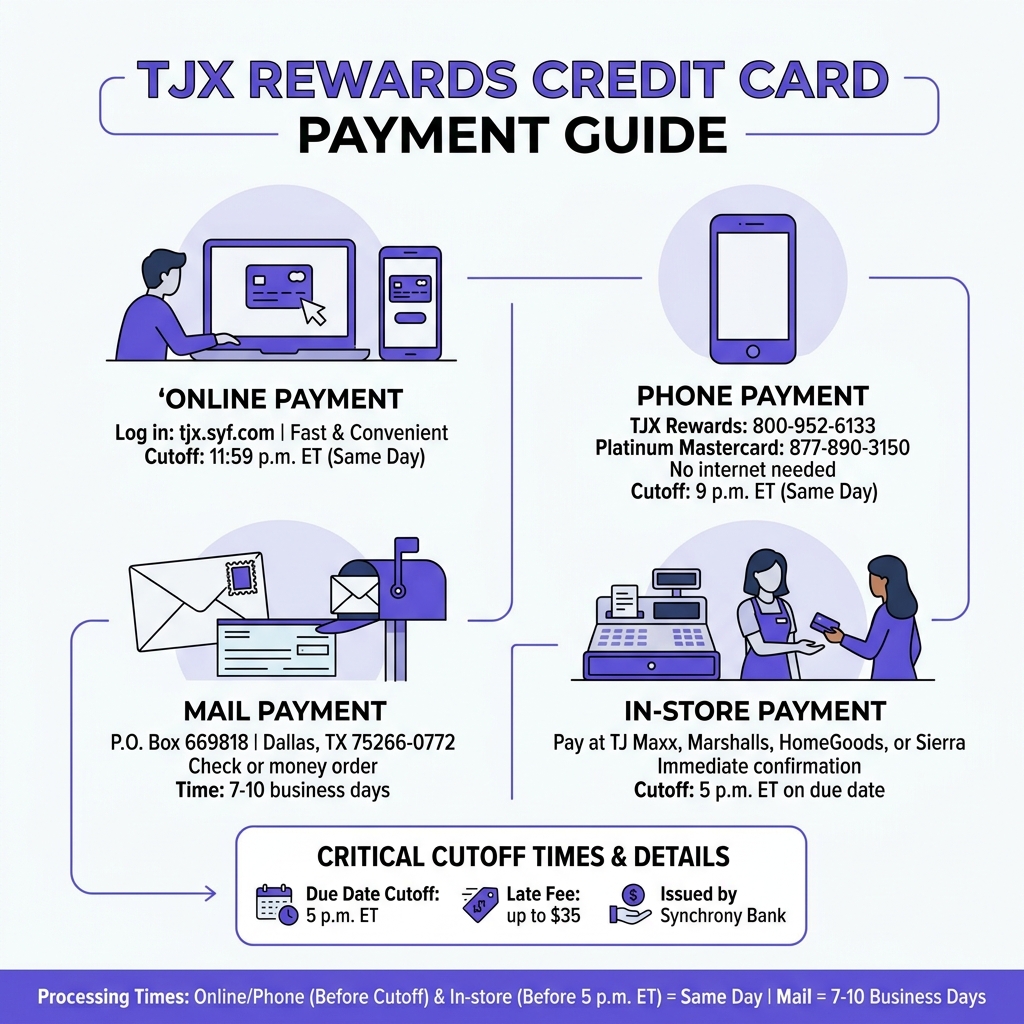
TJ Maxx credit card payment can be made in four main ways:
- Online – Log in at tjx.syf.com and click “Make a Payment”
- By phone – Call 800-952-6133 (TJX Rewards card) or 877-890-3150 (Platinum Mastercard)
- By mail – Send a check or money order to P.O. Box 669818, Dallas, TX 75266-0772
- In-store – Pay at any TJ Maxx, Marshalls, HomeGoods, or Sierra location
Your TJX Rewards credit card is issued by Synchrony Bank. That means all payments go through Synchrony’s platform, whether you pay online, over the phone, or by mail.
Missing a payment can cost you up to $35 in late fees – and payments must arrive by 5 p.m. ET on your due date to count for that day. That’s easy to avoid once you know your options.
Here’s a quick look at what works best depending on your situation:
| Payment Method | Processing Time | Best For |
|---|---|---|
| Online | Same day (before 11:59 p.m. ET) | Fast, convenient payments |
| Phone | Same day (before 9 p.m. ET) | No internet access |
| 7-10 business days | Traditional payers | |
| In-store | Same day | Immediate confirmation |
Below, we’ll walk through each method step by step so you can pick what works for you.
How to Make a TJ Maxx Credit Card Payment Online
For most of us, the internet is the go-to solution for managing bills. When it comes to your tj maxx credit card payment, the online portal provided by Synchrony Bank is the most robust tool available. By using the official Synchrony portal, we can handle everything from one-time transfers to checking our rewards balance.
Managing your account online isn’t just about paying the bill; it’s about total control. You can view your statements, track your 5% back in rewards, and even update your personal information without ever having to wait on hold for a customer service representative. If you are looking for more tips on managing your finances, explore our Money & Credit category for expert advice.
Registering Your Online Account
If you’ve just received your shiny new TJX Rewards card in the mail, your first step should be registering for online access. To get started, you’ll need a few pieces of information handy:
- Your full credit card account number (found on your card or billing statement).
- Your primary billing ZIP code.
- The last four digits of the primary cardholder’s Social Security Number.
- Your date of birth.
Once you provide these details, you’ll create a unique User ID and a secure password. We recommend setting up a security profile with questions that only you can answer. This ensures that your financial data stays protected while giving you 24/7 access to your account.
Using the TJX Rewards Guest Payment Feature
Sometimes, we’re in a rush and don’t want to deal with remembering a password. Synchrony Bank offers a “Pay as Guest” feature that is incredibly helpful for a quick tj maxx credit card payment.
To pay as a guest without logging in, simply click the “Pay as Guest” button at the top of the login page. You will need to enter your card number, the last four digits of your SSN, and your billing ZIP code. From there, you can enter your bank routing and account number to complete the transaction. It’s a lifesaver when you’re near the 5 p.m. ET cutoff and need to move fast!

Alternative Ways to Pay Your TJ Bill
While online payments are popular, they aren’t the only way to keep your account in good standing. Depending on your lifestyle, you might prefer the human touch of an in-store payment or the simplicity of a phone call. It’s always good to have a backup plan, much like knowing What the Open Sky Credit Card Is and Who It’s For can help you diversify your credit options.
TJ Maxx Credit Card Payment by Phone
If you don’t have reliable internet access or prefer using an automated system, paying by phone is a solid choice. Synchrony provides two different numbers based on which card you hold:
- TJX Rewards Credit Card (Store Card): 800-952-6133
- TJX Rewards Platinum Mastercard: 877-890-3150
When you call, have your 16-digit card number and your checking account information ready. The automated system is available 24/7, but if you choose to speak with a live representative to expedite a payment, be aware that there may be an additional fee for this service. To ensure your payment posts the same day, try to call before 9 p.m. ET.
Mailing Your Payment to Synchrony Bank
For those who prefer the traditional route, mailing a check or money order is still an option. However, this requires the most planning. You should aim to mail your payment at least 7 to 10 business days before your due date to account for postal delays.
Make sure to write your full account number on the memo line of your check and send it to the appropriate address:
- For Platinum Mastercard: Synchrony Bank, P.O. Box 669819, Dallas, TX 75266-0773.
- For TJX Rewards Store Card: Synchrony Bank, P.O. Box 669818, Dallas, TX 75266-0772.
Always include the payment coupon from your monthly statement if possible to ensure the funds are applied to the correct account immediately.
Paying In-Store at TJX Family Brands
One of the unique perks of this card is the ability to walk into a store and pay your bill at the register. We can make a tj maxx credit card payment at any of the following locations:
- T.J. Maxx
- Marshalls
- HomeGoods
- Sierra
- Homesense
Simply head to the checkout counter and let the cashier know you’d like to make a credit card payment. You will need your physical card or your account number. You can typically pay using cash, a check, or a debit card. The best part? You get an immediate printed receipt, giving you instant peace of mind that your bill is settled.
Managing Your Account and Rewards
The real reason many of us have this card is the rewards! Every 1,000 points earned equals a $10 Rewards Certificate. To make the most of this, we need to stay on top of our account management.
By logging in, you can access your Rewards Certificates online and see how close you are to your next discount. We also highly recommend enrolling in electronic statements. Not only is it better for the environment, but it also ensures your rewards certificates are delivered straight to your email, so you never lose them in a pile of junk mail.
Using the TJ Maxx Mobile App for Payments
For shoppers on the go, the T.J. Maxx mobile app (available on iOS and Android) is a powerful tool. Once you link your card to the app, you can:
- View your current balance and available credit.
- Track your rewards progress.
- Access a digital version of your card for in-store shopping.
- Make your tj maxx credit card payment directly from your phone.
Using the app at checkout is a great way to ensure you’re earning that 5% back on every purchase without having to dig through your wallet for the physical card.
Setting Up Automatic Payments
If you want to truly simplify your life, Autopay is the answer. Through the Synchrony online portal, we can set up recurring transfers from our bank account. You can choose to pay:
- The minimum payment due (to avoid late fees).
- The full statement balance (to avoid interest).
- A custom fixed amount.
Setting up automatic payments is the best way to protect your credit score and avoid those pesky $35 late fees. Just make sure your connected bank account always has enough funds to cover the transfer!
Understanding Fees, Interest, and Due Dates
To use your card wisely, you have to understand the “fine print.” The tj maxx credit card payment must be received by 5 p.m. ET on your due date. If you miss this window, even by a few minutes, you could be hit with a late fee.
The fee structure generally looks like this:
- $25 if you have been on time for the last six months.
- Up to $35 if you have had a late payment in the previous six billing cycles.
Beyond fees, there is the interest to consider. The APR for purchases is often quite high—around 27.24% (variable based on the Prime Rate). There is also a minimum interest charge of $2.00 if you carry a balance. To avoid these costs entirely, we recommend paying your full statement balance every month within the 23-day grace period. For a full breakdown of the costs, you can see official rates and fees provided by the issuer.
Frequently Asked Questions about TJX Payments
How long does it take for a payment to post?
If you make your tj maxx credit card payment online before the 11:59 p.m. ET cutoff, Synchrony will typically credit the payment to your account the same day. However, it may take 24 to 48 hours for the transaction to reflect in your available credit or for the funds to actually leave your bank account. Mail payments, as mentioned, can take up to 10 days to fully process.
Can I pay my bill at Marshalls or HomeGoods?
Yes! Because all these stores are part of the TJX family, you can pay your T.J. Maxx card bill at Marshalls, HomeGoods, Sierra, or Homesense. Just bring your card to the register. The cashier will process it just like a purchase, but the “total” will go toward your debt instead of new clothes or home decor.
What happens if I miss my payment due date?
If you miss the deadline, the first thing that happens is a late fee (up to $35) is added to your balance. Next, you will begin accruing interest at your card’s APR. If you are more than 30 days late, Synchrony may report the delinquency to the credit bureaus, which can significantly drop your credit score. Additionally, you may forfeit any rewards points earned during that billing cycle.
Conclusion
At ContentVibee, we believe that staying informed is the first step toward financial health. Managing your tj maxx credit card payment doesn’t have to be a chore. Whether you choose the speed of the online portal, the convenience of the mobile app, or the reliability of an in-store visit, the key is consistency.
By setting up payment reminders or enrolling in Autopay, you can enjoy your 5% rewards without the stress of late fees or high interest rates. If you found this guide helpful, we invite you to explore more financial guides on our site to help you master your money and credit. Happy shopping!