


The Best Budgeting Apps for Students in 2026: Quick Answer
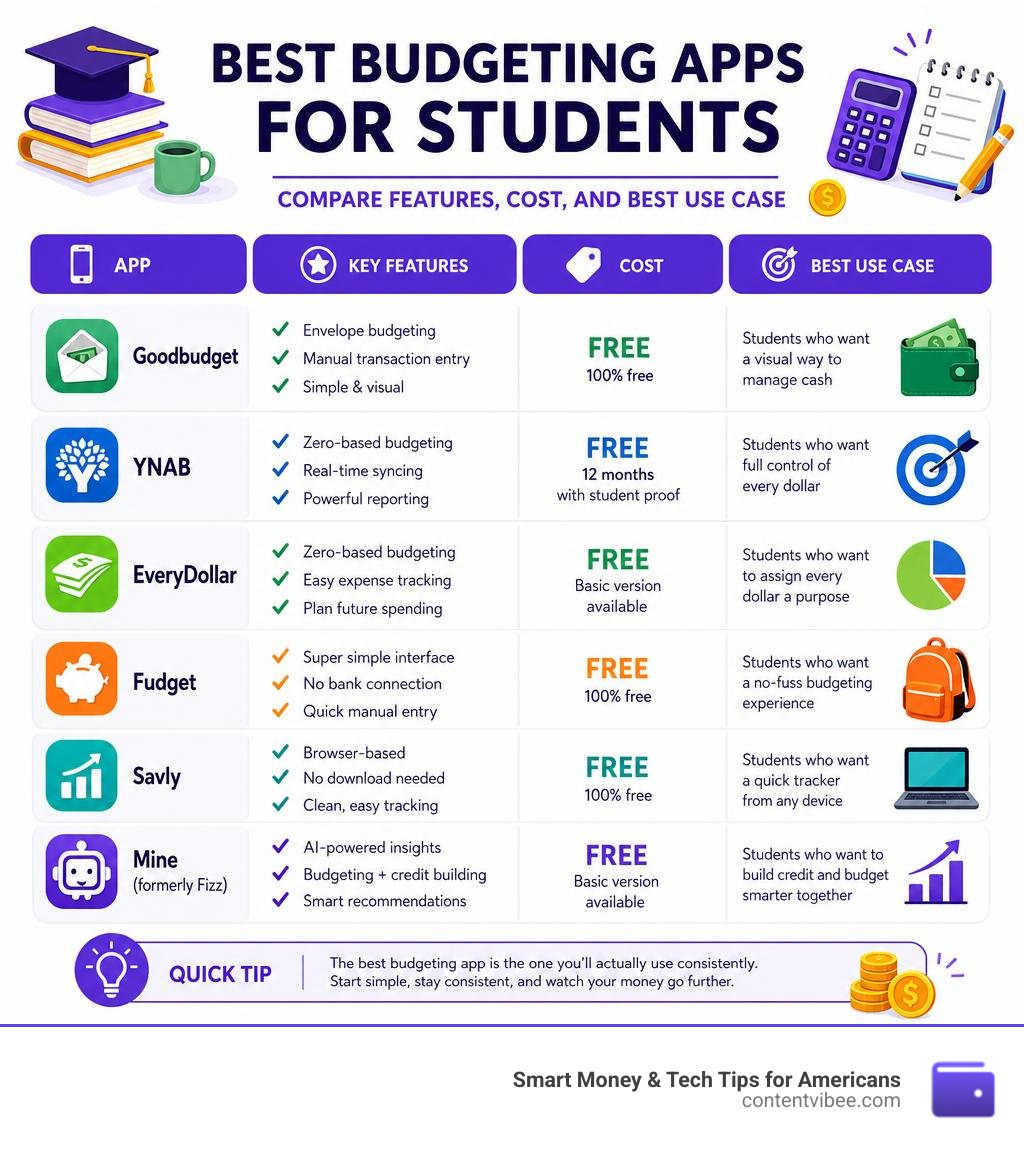
The best budgeting apps for students right now are:
- Goodbudget – Best free envelope-method app for visual spenders
- YNAB – Best zero-based budgeting app (free for 12 months with student proof)
- EveryDollar – Best for assigning every dollar a purpose
- Fudget – Best ultra-simple app with no bank connection required
- Savly – Best free browser-based tracker with no download needed
- Mine (formerly Fizz) – Best AI-powered app for building credit and budgeting together
“Where did my paycheck disappear to?” It’s a question almost every college student asks at some point — usually around week eight of a twelve-week semester.
Student budgets are genuinely tricky. Income arrives in unpredictable chunks: a financial aid refund here, a work-study check there, maybe a scholarship deposit once a semester. Meanwhile, expenses hit constantly — rent, groceries, textbooks, the occasional pizza. Most budgeting tools are built for people with steady salaries and predictable bills. That mismatch is exactly why so many students run out of money before the term ends.
The good news? A new wave of apps is designed specifically around how students actually get paid and spend. And the data backs them up — students who use budgeting apps are 2.5 times more likely to stick to a monthly budget than those who track expenses by hand.
This guide cuts through the noise and shows you which apps are actually worth your time (and which are worth your money, if any).
Budgeting apps for students terms to learn:
Why Budgeting Apps for Students Are Essential in 2026

Living on your own for the first time is an incredible milestone, but it also comes with a steep financial learning curve. Suddenly, you are responsible for buying your own groceries, paying rent, purchasing textbooks, and funding your social life. Without a system in place, it is incredibly easy to overspend.
The traditional way of tracking money—spreadsheets or paper ledgers—simply doesn’t fit the life of a modern college student. This is where budgeting apps for students come in. Technology makes personal finance during your college years easier, faster, and much more engaging.
According to recent statistics on student budgeting habits, over 60% of college students report that budgeting apps help them reduce overspending on subscriptions and non-essential purchases. When you can see your real-time balance on your phone before tapping your card for a morning latte, you make smarter, more conscious decisions.
Additionally, college students face unique financial structures:
- Irregular Income: Unlike a standard 9-to-5 job with biweekly paychecks, students often rely on work-study pay, random tutoring gigs, or allowances.
- Lump-Sum Disbursements: Financial aid, student loans, and scholarships usually land in your bank account all at once at the start of the semester.
- Hidden Expenses: Subscriptions, campus events, lab fees, and printing costs can quietly drain your account if they aren’t explicitly tracked.
Learning to budget early in college builds a strong foundation for the future. As we like to say at ContentVibee, saving early pays off massively. In fact, saving just $50 a month at age 19 is worth far more by the time you retire than saving $500 a month starting at age 30 due to the power of compound interest.
Top Budgeting Apps for College Students to Track Spending
To help you choose the right fit, we have broken down how the top free and paid budgeting apps stack up against each other for student use:
| Budgeting App | Pricing | Best Feature | Sync Method | Budgeting Style |
|---|---|---|---|---|
| Goodbudget | Free (Up to 20 envelopes) / $8/mo Premium | Digital Envelope System | Manual (Free) / Sync (Premium) | Envelope Budgeting |
| Savly | Free (Up to 4 categories) / ~$7.50/mo Premium | No download required, browser-based | Manual | Simple Tracking |
| EveryDollar | Free (Manual entry) / $79.99/yr Premium | Zero-based budgeting framework | Manual (Free) / Auto-Sync (Premium) | Zero-Based |
| Fudget | Free / Low-cost Pro upgrade | Ultra-simple list interface | Manual | Basic Ledger |
| YNAB (You Need A Budget) | Free for 12 months, then $109/year | Giving every dollar a job | Auto-Sync with Bank | Zero-Based |
| Mine (MoneyGPT) | Free to download | Credit building & game-like lessons | Auto-Sync with Bank | AI-Driven |
| Blitz Money | $0.99/month for early cash access | AI budget coach & gig finder | Auto-Sync with Bank | AI & Cash App |
Best Free Budgeting Apps for Students on a Budget
If you are living on ramen and textbook-induced credit card debt, paying a monthly subscription for a budgeting app feels completely counterproductive. Fortunately, there are fantastic free budgeting tools for college that offer robust features without costing a dime.
1. Goodbudget
Goodbudget is a digital adaptation of the traditional paper envelope system. Instead of stuffing physical cash into envelopes labeled “Groceries” or “Rent,” you do it virtually.
- How it works: You allocate your income into specific digital envelopes at the start of the month. When you spend money, you subtract it from the corresponding envelope. If you overspend, the envelope turns red, giving you an immediate visual warning.
- Why it’s great for students: It is perfect for roommates or couples. Goodbudget allows you to sync and share budgets across devices, helping roommates reduce joint household overspending by up to 25%.
- Pricing: The free tier gives you 20 envelopes and access on two devices, which is more than enough for student life. You can learn more directly on the Goodbudget website.
2. Savly
Savly is a fantastic option for students who want zero complexity and do not want to download another app to their cluttered phone screens.
- How it works: It is a browser-based web app that works seamlessly on any laptop, tablet, or phone.
- Why it’s great for students: It requires no bank connection and no credit card to sign up. The free tier gives you unlimited transactions, up to 4 budget categories (perfect for keeping things simple), and 1 savings goal.
- Pricing: Free forever, with an option to upgrade to Premium for more categories and AI assistance.
3. EveryDollar
Created by personal finance expert Dave Ramsey, EveryDollar operates on a zero-based budgeting system.
- How it works: Every single dollar of your income is assigned a specific job (e.g., $100 to groceries, $50 to savings, $20 to fun) until you have $0 left unallocated. Students using zero-based budgeting apps like EveryDollar report saving an average of $150 to $300 per semester.
- Why it’s great for students: It forces you to be intentional with your money. The free version requires you to manually log your transactions, which actually helps beginners build a stronger awareness of their spending habits.
4. Fudget
If even “envelopes” and “zero-based budgeting” sound too complicated, Fudget is your answer.
- How it works: It is essentially a glorified, beautifully designed digital notepad. You list your income, list your expenses, and Fudget subtracts one from the other to show you what is left.
- Why it’s great for students: There are no complicated charts, no bank syncing issues, and no learning curves. It is perfect for quick, stress-free tracking during finals week.
How Paid Budgeting Apps for Students Compare to Free Options
While free apps are fantastic, paid options often offer automated features that save you time. Nearly 70% of college students say that automatic transaction syncing in budgeting apps saves them at least two hours per month on manual tracking. If you have a busy class schedule, that time savings might be worth the investment.
YNAB (You Need A Budget)
YNAB is widely considered the gold standard of budgeting apps. It operates on four rules, starting with “Give Every Dollar a Job.”
- The Student Deal: While YNAB normally costs around $109 per year, college students get YNAB completely free for 12 months with proof of enrollment (like a school transcript or student ID).
- Why it’s worth it: YNAB doesn’t just track where your money went; it teaches you how to change your relationship with money. It helps you plan for “true expenses” (like annual software subscriptions or semesterly textbook purchases) by breaking them down into manageable monthly targets.
BudgetWizard
BudgetWizard is a simpler, cheaper alternative to YNAB, costing $4.99 per month after a free trial. It requires no bank connection, making it highly secure and easy to run on school laptops. It separates your income tracking from your expense tracking, which is incredibly helpful when managing irregular student income.
M4L-C (Money For Life, College Edition)
M4L-C is a privacy-first app priced at a student rate of $7 per month (compared to the regular $27 rate). It operates on the philosophy of “pay yourself first.” It does not connect to your bank, ensuring your data is completely encrypted and never sold to third-party advertisers. It takes less than two minutes to set up and encourages you to reflect on whether every purchase was actually “worth it.”
AI-Powered Financial Tools for Gen Z
For students who want automated, highly personalized financial guidance, AI-powered tools are changing the game in 2026.
- Mine (formerly Fizz): Dubbed “MoneyGPT,” Mine is an all-in-one financial app that provides game-like personal finance lessons and a 2-minute “Money GPA” quiz. It also offers free credit score tracking with no hard inquiries, helping students establish their credit history step-by-step.
- Copi: Copi acts as an AI financial advisor built specifically for student life. It uses secure, read-only Plaid integration to pull your transactions and offers proactive “micro-shifts” to curb impulse spending without requiring you to radically change your lifestyle.
- Blitz Money: Positioned as an AI-powered cash app, Blitz Money is the ultimate college money wingman. It features “Budget GPT” to manage your money, “Jobs GPT” to identify spending gaps and suggest nearby part-time gigs, and “Deals GPT” to scan receipts and find cash-back offers. Plus, it offers early access to small cash deposits ($9 to $99) for a flat fee of 99 cents per month—perfect for avoiding overdraft fees when your account runs low.
How to Manage Irregular Income and Lump-Sum Disbursements

One of the biggest financial hurdles for students is managing lump-sum payments. When a $5,000 student loan refund or a scholarship check lands in your account at the start of the semester, it can feel like you’ve won the lottery. But without a plan, that money can easily vanish by week eight.
To stretch these lump sums, we recommend building a “Study Budget” based on your academic term rather than a standard calendar month:
- Calculate Your Net Term Income: Add up your loan refund, scholarship disbursements, and any estimated work-study or part-time job income for the semester.
- Subtract Fixed Costs First: Deduct your rent, tuition fees, and required textbook costs for the entire term immediately.
- Establish an Emergency Buffer: Keep a small buffer (at least $200 to $500) in a separate account for unexpected medical bills, laptop repairs, or emergency travel.
- Divide the Rest Weekly: Take your remaining money and divide it by the number of weeks in the semester (usually 15 or 16 weeks). This gives you your strict weekly spending allowance.
By using apps like Goodbudget or YNAB, you can log your lump sum as one-time income and tag your weekly withdrawals, allowing you to watch the drawdown in real-time and adjust your spending before you hit a financial wall.
Frequently Asked Questions About Student Budgeting
What is the best free budgeting app for college students?
The best free app depends on your personal style. If you want a visual, shared system, Goodbudget is excellent. If you prefer a simple, private tool that works on any device without a bank connection, Savly or Fudget is your best bet. For a structured, zero-based approach, the free tier of EveryDollar is highly effective.
How do I budget a student loan refund or scholarship?
Do not treat a refund check as “free money.” Calculate your total essential expenses for the term, subtract them from the refund, and divide the remaining balance by the number of weeks in the semester to establish a weekly allowance. Use a budgeting app to track this drawdown weekly.
Is YNAB or Goodbudget better for a college student?
If you can take advantage of YNAB’s free 12-month student trial, YNAB is superior for building long-term financial habits and automated tracking. However, if you prefer manual tracking, want to share a budget with roommates, or don’t want to pay a subscription fee after the first year, Goodbudget is a fantastic, simpler alternative.
Conclusion
Mastering your money in college is one of the most valuable lessons you will ever learn. By using the right budgeting apps for students, you can curb overspending, handle irregular income, and navigate student loans without constant stress.
At ContentVibee, we believe that smart money habits built today pave the way for financial freedom tomorrow. Take a few minutes to download one of these apps, set up your categories, and take control of your financial future.
To see exactly how much you can save over time by cutting back on minor expenses, check out our free ContentVibee Finance Calculator and start planning your path to debt-free graduation today!


