


Why Every Pre-Retiree Needs a 401k Contribution Limit Calculator in 2026
A 401k contribution limit calculator is one of the fastest ways to find out exactly how much you can save this year — and whether you’re on track to hit that number.
Here’s a quick answer to the most common questions:
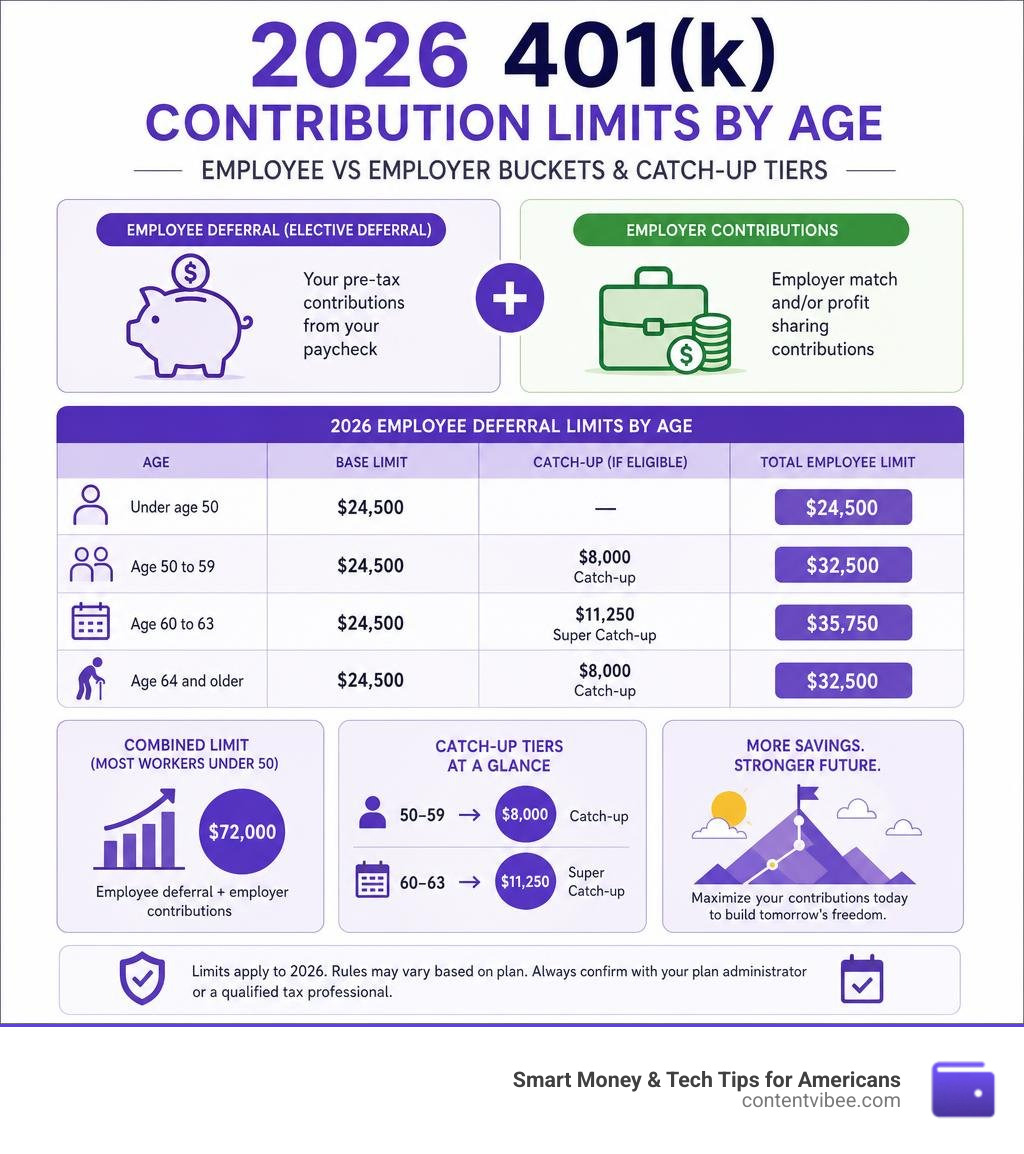
| Who You Are | 2026 Employee Deferral Limit |
|---|---|
| Under age 50 | $24,500 |
| Age 50 to 59 | $32,500 (includes $8,000 catch-up) |
| Age 60 to 63 | $35,750 (includes $11,250 super catch-up) |
| Age 64 and older | $32,500 (standard catch-up applies) |
The combined limit — your contributions plus your employer’s — reaches $72,000 for most workers under 50 in 2026.
Most people don’t realize how much they’re leaving on the table. A 3% employer match on a $60,000 salary is $1,800 a year in free money. Miss that over a 35-year career and you could lose roughly $180,000 in potential growth at a 7% return.
The math gets more complex as you add catch-up rules, pay frequency, year-to-date balances, and employer match formulas. That’s exactly where a contribution limit calculator earns its keep.
This guide walks you through everything — from how these calculators work to the special rules for self-employed individuals.
401k contribution limit calculator word roundup:
- compound interest calculator monthly
- monthly loan repayment calculator
- monthly payment on $15000 car loan
How To Use a 401k Contribution Limit Calculator to Maximize Savings
At its core, a 401k contribution limit calculator is a digital math assistant designed to translate confusing tax laws into a simple, per-paycheck plan. It takes your unique financial puzzle pieces and arranges them so you can see exactly how much you can safely tuck away without triggering IRS penalties.
To get the most accurate results, you need to feed the calculator a few essential inputs:
- Annual Gross Salary: Your total expected earnings before taxes.
- Pay Frequency: How often you get paid (e.g., weekly, bi-weekly, semi-monthly, or monthly).
- Current Age: Used to determine your eligibility for standard and super catch-up contributions.
- Year-to-Date (YTD) Contributions: How much you have already contributed to your 401(k) plan so far this year.
- Employer Match Details: The percentage of your salary your employer matches (e.g., 100% match up to 3% of pay).
The calculator processes these inputs through a series of formulas to determine your remaining “contribution room” and projects how much you should contribute from each remaining paycheck to hit your goals.

Using these tools removes the guesswork from retirement planning. Instead of crossing your fingers and hoping you do not over-contribute, you can establish an exact, automated savings rate. To see how these calculations fit into your broader financial plan, check out our guide on how to Stop Guessing and Start Planning with the Best Retirement Planning Tools.
Why You Need a 401k Contribution Limit Calculator in 2026
The year 2026 has brought fresh updates to IRS contribution limits, making manual calculations more challenging than ever. The base elective deferral limit has jumped to $24,500. If you are trying to max out your contributions, simply dividing $24,500 by your total pay periods at the start of the year works perfectly—assuming nothing changes.
But life is rarely that static. Mid-year adjustments are incredibly common. You might receive a raise, experience a job change, or decide to increase your savings rate in August after realizing you have some extra cash flow.
If you adjust your contributions mid-year, a calculator helps you recalculate your “paycheck pacing.” For example, if you are 35 years old and have contributed $5,000 by July, you have $19,500 of room left for the year. If you have 10 paychecks remaining, a calculator will instantly tell you that you need to defer $1,950 per paycheck to max out. To learn more about tracking your progress, read our Beginners Guide to Retirement Calculator.
Key Features of a Reliable 401k Contribution Limit Calculator
Not all online tools are created equal. When searching for a reliable 401k contribution limit calculator, you should look for several key features:
- Browser-Based and Privacy-First: You should not have to hand over your email address, phone number, or social security number just to run some numbers. The best tools run entirely in your browser with zero data collection.
- Up-to-Date Tax Rules: The tool must reflect the latest 2026 IRS limits, including the newer SECURE 2.0 catch-up rules.
- Tax Modeling: A great calculator will show you the immediate tax savings of traditional pre-tax contributions versus the long-term tax-free benefits of Roth contributions.
- Multi-Tier Matching Logic: Employer matches are rarely simple. A good calculator can handle tiered matching (e.g., 100% on the first 3%, and 50% on the next 2%).
For a comprehensive set of privacy-focused financial tools, we invite you to Explore our comprehensive suite of financial tools on ContentVibee.
Understanding the 2026 IRS 401(k) Contribution Limits

Every year, the IRS adjusts retirement contribution limits to keep pace with inflation. Keeping track of these changes is essential to avoid leaving matching money on the table or accidentally over-contributing. For the official IRS overview of these rules, see the agency’s page on 401(k) and profit-sharing plan contribution limits.
Let’s look at how the limits have shifted from last year to this year:
| Limit Category | 2025 Limit | 2026 Limit | Change |
|---|---|---|---|
| Employee Elective Deferral (Under 50) | $23,500 | $24,500 | +$1,000 |
| Standard Catch-Up (Age 50-59, 64+) | $7,500 | $8,000 | +$500 |
| Super Catch-Up (Age 60-63) | $11,250 | $11,250 | $0 |
| Total Annual Additions (Under 50) | $70,000 | $72,000 | +$2,000 |
| Annual Compensation Cap | $350,000 | $355,000 | +$5,000 |
These limits are the legal boundaries within which your retirement strategy must operate.
Employee Elective Deferrals vs. Annual Additions Limit
One of the most common points of confusion is the difference between the employee elective deferral limit and the overall annual additions limit (regulated under Section 415(c) of the Internal Revenue Code).
- Employee Elective Deferral Limit ($24,500 in 2026): This is the absolute maximum amount of money you can contribute out of your own paycheck as a pre-tax or Roth contribution.
- Annual Additions Limit ($72,000 in 2026): This is the maximum cap for all money entering your 401(k) account during the calendar year. It includes your personal elective deferrals, your employer’s matching contributions, any profit-sharing contributions, and after-tax (non-Roth) contributions.
If your plan allows after-tax contributions, you can potentially save far beyond the $24,500 limit by utilizing a strategy often called the “Mega Backdoor Roth.” To dive deeper into this advanced wealth-building strategy, check out our guide on After Tax Contributions How to Maximize Your Retirement Nest Egg.
Catch-Up Contributions and SECURE 2.0 Rules for Ages 60-63
If you are 50 or older, the IRS allows you to make “catch-up” contributions to accelerate your retirement readiness. In 2026, the standard catch-up limit is $8,000, meaning workers age 50 to 59 can contribute a total of $32,500 of their own salary.
However, the SECURE 2.0 Act introduced a special “super catch-up” tier for individuals aged 60, 61, 62, and 63. If you fall into this age bracket in 2026, your catch-up limit is bumped to $11,250, allowing you to defer a whopping $35,750 of your own compensation. Once you turn 64, the catch-up limit reverts back to the standard $8,000 level.
Important 2026 Roth Catch-Up Rule: Under SECURE 2.0, starting January 1, 2026, if you earned more than $150,000 in the previous calendar year (2025), any catch-up contributions you make must be made as Roth (after-tax) contributions. If your income was $150,000 or less, you can still choose between pre-tax or Roth catch-up contributions.
How Employer Matching and Paycheck Variables Affect Your Calculations
To maximize your retirement savings, you must understand how your paycheck structure and employer matching benefits interact. If you do not coordinate these variables, you could accidentally leave free money on the table. For a detailed breakdown of how to optimize your company’s matching program, read Dont Leave Money on the Table The Ultimate 401k Max Calculator Guide.
Factoring in the Employer Match and True-Up Contributions
Employer matching is the closest thing to a “guaranteed return” you will ever find in the financial world. If your company matches 100% of your contributions up to 3% of your salary, and you earn $60,000, they are handing you $1,800 a year just for saving.
However, how you pace your contributions throughout the year can impact whether you actually receive that full match.
Many employers calculate their match on a per-paycheck basis. This means if you do not contribute to your 401(k) during a specific pay period, your employer will not deposit a match for that period either.
If you decide to “front-load” your contributions—meaning you max out your full $24,500 limit by August—you will have 0% contributions for the remaining months of the year. If your employer does not offer a “true-up” provision, you will completely forfeit the matching funds for September, October, November, and December. A true-up is an end-of-year audit where the employer calculates what your match should have been based on your total annual contribution and cuts a check for the difference. If your plan lacks this feature, you must use a calculator to spread your contributions evenly across all 12 months.
How Pay Frequency and Year-to-Date Contributions Impact Your Pace
Your pay frequency dictates the math behind your payroll deferral elections. Let’s look at how pay frequencies distribute the standard $24,500 limit:
- Weekly (52 paychecks): ~$471.15 per paycheck
- Bi-Weekly (26 paychecks): ~$942.30 per paycheck
- Semi-Monthly (24 paychecks): ~$1,020.83 per paycheck
- Monthly (12 paychecks): ~$2,041.67 per paycheck
If you are starting fresh in January, the math is simple. But if you are adjusting your rate mid-year, you must subtract your Year-to-Date (YTD) contributions from the annual limit, then divide the remaining amount by your remaining paychecks.
For example, if you have contributed $8,500 by July and have 12 bi-weekly paychecks remaining:
- Remaining Room: $24,500 – $8,500 = $16,000
- New Per-Paycheck Goal: $16,000 / 12 = $1,333.33 per paycheck
Tracking your YTD contributions is also critical if you changed jobs mid-year. Your new employer’s payroll system has no idea how much you contributed at your previous job. If you do not manually calculate your remaining room, you could easily exceed the $24,500 elective deferral limit, leading to tax headaches.
Calculating Solo 401(k) Limits for Self-Employed Individuals

If you are a freelancer, independent contractor, or sole proprietor with no full-time employees (other than your spouse), the Solo 401(k) is one of the most powerful retirement accounts available. It allows you to act as both the employee and the employer, which can dramatically increase your maximum annual savings.
By contrast, a SEP-IRA only allows you to contribute as the employer (up to 25% of net adjusted earnings). Because a Solo 401(k) allows you to contribute as an employee first, you can save much more at lower income levels. For instance, at $100,000 of net self-employment income, you can contribute roughly $43,500 to a Solo 401(k) compared to only about $18,500 with a SEP-IRA. At $300,000 of net income, both accounts allow you to max out at the full $72,000 combined cap.
The Circular Calculation for Sole Proprietors and S-Corps
Calculating your Solo 401(k) contribution limit as a self-employed individual is famously complex because of what accountants call a “circular calculation.”
For an S-Corporation owner-employee, the calculation is straightforward because it is based on your W-2 salary. You can defer up to $24,500 as an employee, and the business can contribute up to 25% of your W-2 salary as an employer profit-sharing contribution, up to the combined $72,000 cap.
However, if you are a sole proprietor or a single-member LLC filing on Schedule C, your “compensation” is based on your net earnings from self-employment. To find this, you must:
- Calculate your net business profit on Schedule C.
- Subtract the deductible portion of your self-employment tax (exactly 50%).
- Subtract your own retirement contribution.
Because your plan contribution depends on your plan compensation, and your plan compensation depends on your plan contribution, you cannot use a simple 25% rate. Instead, sole proprietors must use a reduced rate of 20% (or a contribution rate factor of 0.150000 if your plan rate is 15%) as outlined in IRS Publication 560.
To avoid making math mistakes that could result in over-contributions and IRS penalties, using a dedicated self-employed contribution calculator is highly recommended.
Frequently Asked Questions about 401(k) Contributions
Does a Roth 401(k) have different contribution limits?
No. Traditional (pre-tax) and Roth (after-tax) 401(k) contributions share the exact same annual employee elective deferral limit ($24,500 in 2026, or more if you are catch-up eligible). You can choose to put 100% of your contributions into traditional, 100% into Roth, or split them in any combination (e.g., $12,250 in traditional and $12,250 in Roth), as long as the combined total does not exceed your annual limit.
What happens if I accidentally over-contribute to my 401(k)?
If you exceed the annual elective deferral limit, you must notify your plan administrator immediately and request a corrective distribution of the excess deferrals plus any associated investment earnings.
If you withdraw the excess and its earnings by April 15 of the following year, the excess amount is taxed in the year it was contributed, and the earnings are taxed in the year they are distributed. If you miss the April 15 deadline, you will face double taxation: the excess amount is taxed in the year contributed and taxed again in the year it is withdrawn.
Does the employer match count toward my personal elective deferral limit?
No. Your personal elective deferral limit ($24,500 in 2026) only applies to the money you choose to contribute from your own paycheck. Your employer’s matching or profit-sharing contributions do not count toward this $24,500 cap. Instead, employer contributions count toward the broader annual additions limit under Section 415(c), which is $72,000 in 2026.
Conclusion
Taking control of your retirement savings does not require an advanced degree in finance. By utilizing a 401k contribution limit calculator, you can easily navigate changing IRS limits, optimize your paycheck pacing, and make sure you are capturing every single dollar of your employer’s match.
Whether you are trying to max out your standard employee deferrals, utilizing the new SECURE 2.0 super catch-up rules, or calculating complex sole proprietorship contributions, the key is consistency and planning.
To continue mapping out your long-term retirement path, we recommend using our Retirement Calculator Estimate Savings Needed to determine your ultimate target, and reading our guide on The 4 Percent Retirement Withdrawal Calculator to plan your post-career income strategy.
Ready to run your own numbers? Explore our comprehensive suite of financial tools on ContentVibee and take the guesswork out of your financial future today!