


Why So Many Beginners Struggle to Stick With a Budget (And How the Right App Fixes That)
The best budget apps for beginners make it easy to see where your money goes — without needing a finance degree or hours of setup.
Here are the top picks to get you started fast:
| App | Best For | Free Option | Bank Sync |
|---|---|---|---|
| Goodbudget | Envelope budgeting | Yes | Premium only |
| PocketGuard | Automated tracking | Yes | Yes |
| Budgetum | Offline privacy | Yes | No |
| Piggy Budget | Zero-based planning | Trial | Premium |
| Simple Budget | Fully offline/manual | Yes | No |
Most people who try budgeting give up within the first few weeks. Not because they lack discipline — but because the tool they chose didn’t fit the way they actually think about money.
If you’ve ever opened a spreadsheet, felt overwhelmed, and closed it again, you’re not alone.
The good news: budgeting apps have come a long way. Whether you want to automatically sync your bank accounts or prefer to manually track every dollar for better awareness, there’s an app built for your style.
And for retirees or those approaching retirement, getting a clear picture of monthly cash flow isn’t just helpful — it’s essential. Knowing exactly what you’re spending each month gives you real control over how long your savings will last.
This guide cuts through the noise and shows you which beginner-friendly apps are worth your time in 2026.
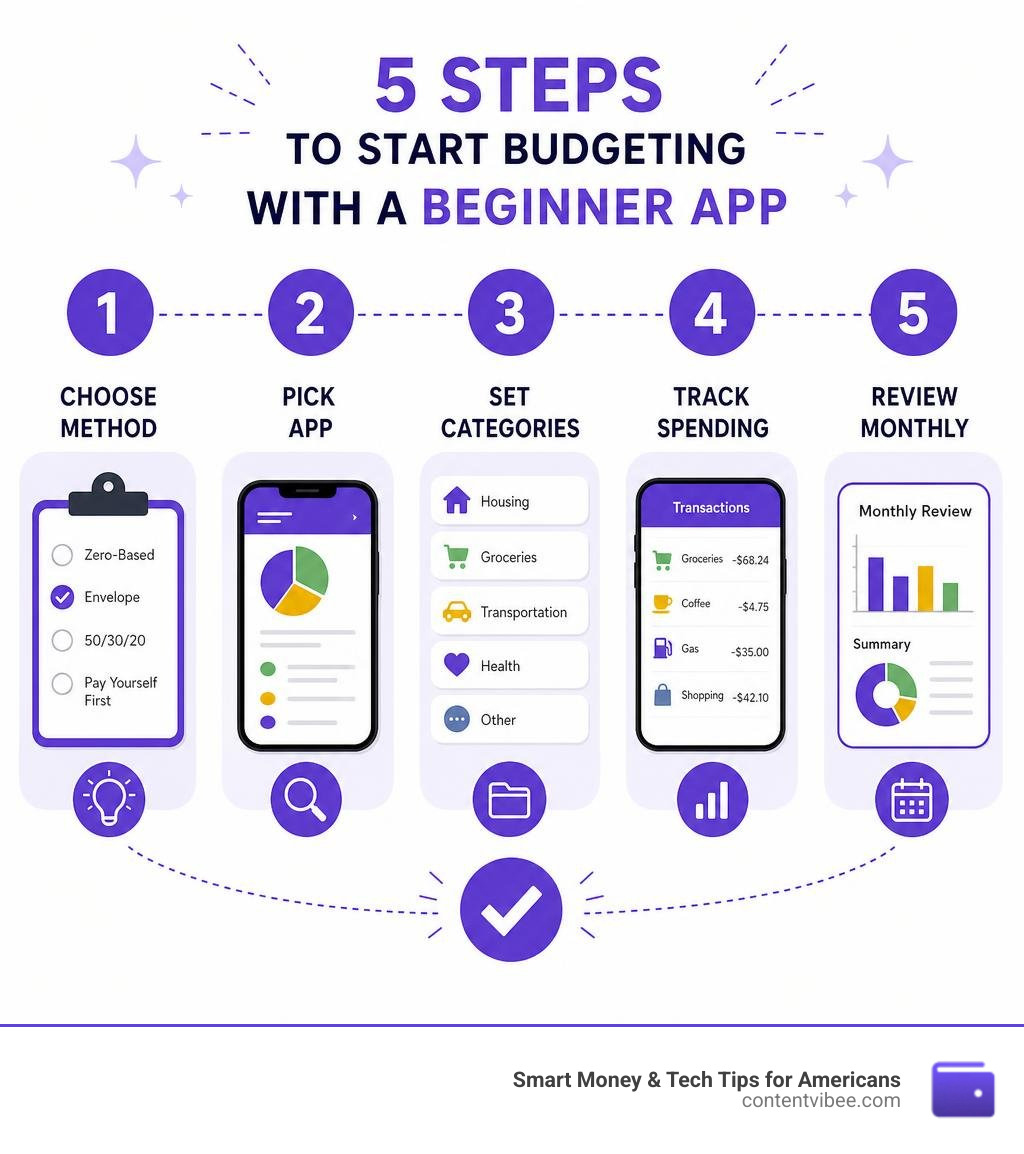
Simple guide to budget apps for beginners terms:
What Makes Budget Apps for Beginners Actually Work?
When you are first starting out, a budgeting app should feel like a helpful guide, not an aggressive auditor. The primary reason beginners abandon their budgets is friction. If an app is too complicated, requires hours of manual categorization, or constantly disconnects from your bank, you will likely stop opening it.
To find the right fit, we need to look at the core features that make budget apps for beginners successful.
Core Features to Look For
- Intuitive Interfaces: The dashboard should give you an immediate, easy-to-understand snapshot of your financial health. If you have to dig through five menus just to log a cup of coffee, the app is too complex.
- Flexible Categorization: Life is unpredictable. Your app should allow you to adjust your spending categories mid-month without breaking your entire budget.
- Actionable Insights: Instead of just showing you historical charts of where your money went, the best apps tell you what you have left to spend right now.
Manual Entry vs. Bank Syncing
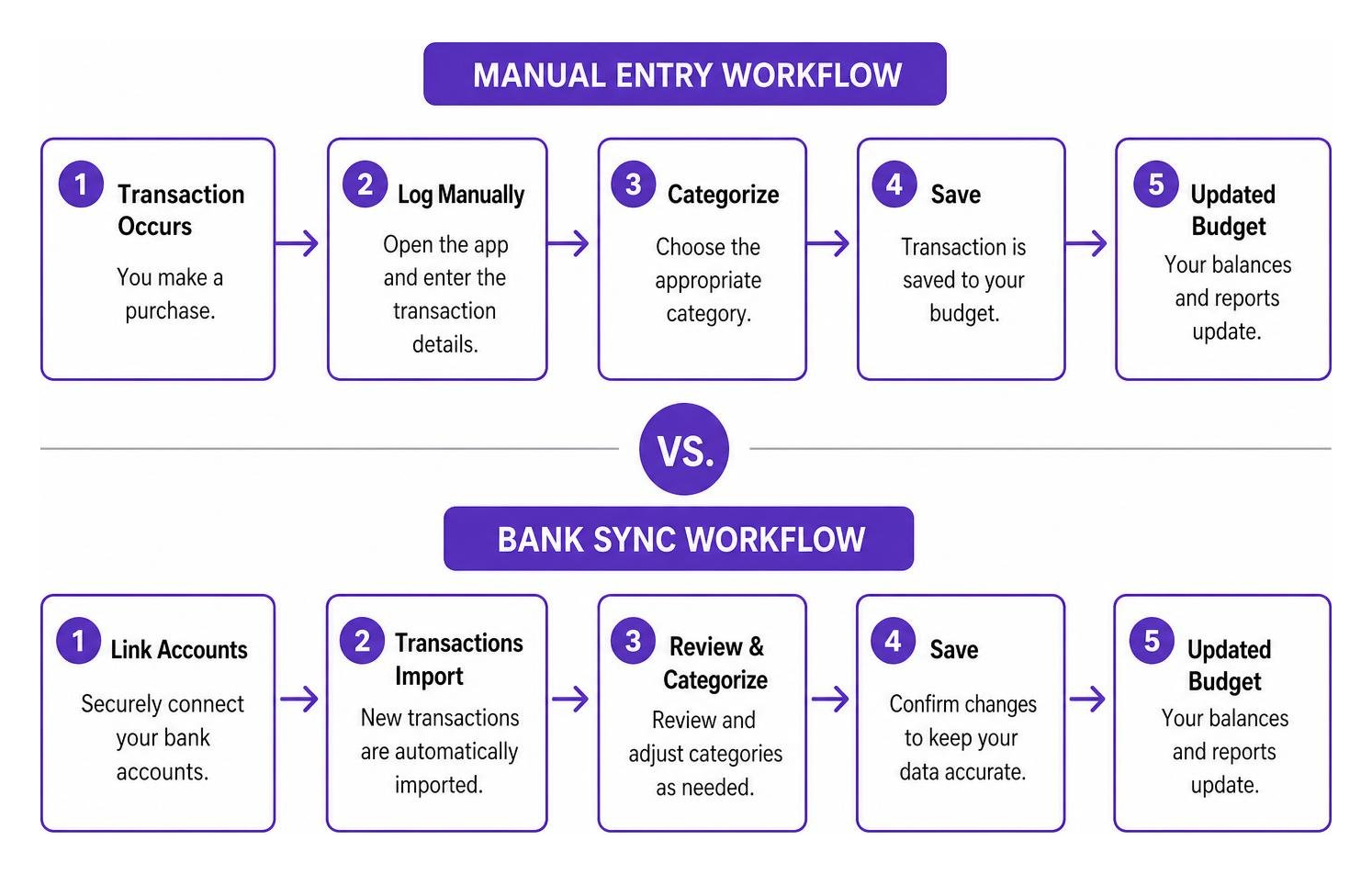
One of the biggest choices you will make is whether to link your bank accounts.
- Bank Syncing: This method automatically pulls your transactions into the app using secure third-party aggregators like Plaid. It is incredibly convenient and saves time, making it ideal for busy people. However, it can sometimes lead to a “set-it-and-forget-it” mentality where you stop actively looking at your expenses.
- Manual Entry: This requires you to physically type in every transaction. While it sounds tedious, manual entry forces a high level of financial awareness. You feel the immediate impact of every dollar spent. It is also the ultimate choice for privacy-conscious users who prefer not to link their bank credentials to a third-party app.
Choosing Your Budgeting Method
Different apps support different financial philosophies. Finding an app that aligns with your preferred method is key:
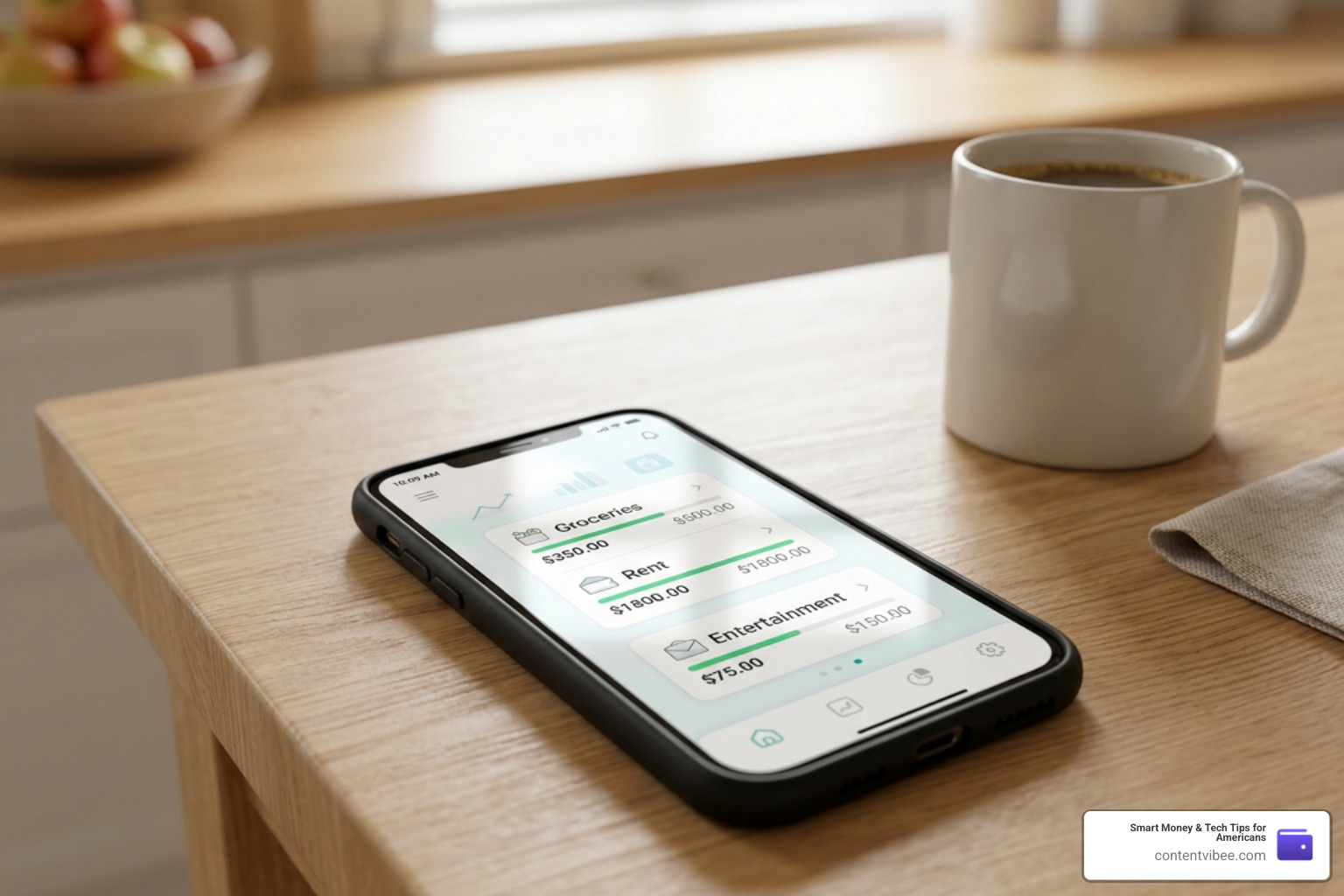
- The Envelope Method: Historically, this involved putting physical cash into labeled paper envelopes (e.g., Groceries, Rent, Entertainment). Once the cash in an envelope was gone, you couldn’t spend any more in that category. Modern apps digitize this process, letting you allocate your digital income into virtual envelopes.
- Zero-Based Budgeting: This method operates on the principle that “every dollar has a job.” If you earn $4,000 this month, you must allocate all $4,000 to specific categories—including savings, debt payoff, and investments—leaving you with exactly $0 unassigned.
Common Beginner Mistakes
Many beginners set overly restrictive budgets in their first month, treating any overspending as a failure. In reality, your first few months of budgeting are simply about gathering data.
Another common pitfall is forgetting to plan for irregular expenses (like annual insurance premiums or holiday gifts), which can completely derail a monthly plan. Using the right app helps you set aside small amounts monthly to cover these “surprise” costs.
For those looking at their long-term financial picture, integrating your daily budget with robust retirement planning tools ensures that your short-term spending habits align with your long-term dreams of financial freedom.
Top-Rated Budget Apps for Beginners to Try in 2026
To help you choose, we analyzed the best options on the market in July 2026. These platforms have been vetted for their ease of use, security, and real-world performance based on thousands of user reviews.
Goodbudget: Best of Budget Apps for Beginners Using Envelopes
If you want to try the classic envelope system without carrying around envelopes stuffed with cash, Goodbudget is the gold standard.
Goodbudget: Best Home Budget App for Android, iPhone, & Web is designed around the “Envelope Method.” When you get paid, you distribute your income into virtual envelopes for different spending categories. When you make a purchase, you manually log the transaction and deduct it from the appropriate envelope.
Key Features & Pricing
- The Free Tier: Highly functional for beginners. It allows you to create up to 10 regular envelopes, track your spending on up to two devices, and retains your spending history for up to one year.
- Goodbudget Premium: Costs $10 per month or $80 per year. This tier unlocks unlimited envelopes, supports up to five devices, and allows you to import bank statements to make logging transactions much faster.
- Sharing Capabilities: One of Goodbudget’s biggest strengths is budget syncing. Couples or family members can access the same account across multiple devices, making it incredibly easy to stay on the same page.
PocketGuard: Best of Budget Apps for Beginners Seeking Automation
For those who prefer a hands-off, automated approach to tracking their cash flow, PocketGuard is an exceptional choice.
PocketGuard: Budgeting App & Finance Planner for iPhone, Android … links directly to your financial accounts to build a real-time picture of your money. It is trusted by over 1 million members and boasts a strong 4.6 rating on the iOS App Store.
Key Features & Pricing
- Massive Bank Integration: PocketGuard connects to checking, savings, credit cards, loans, and investment accounts across more than 18,000 financial institutions.
- The “In My Pocket” Feature: This is PocketGuard’s standout tool. It automatically calculates your income, subtracts your recurring bills and savings goals, and tells you exactly how much safe-to-spend cash you have left for daily expenses.
- Subscription & Bill Finder: The app uses smart algorithms to identify recurring payments and subscriptions, helping you spot forgotten services that are draining your account.
- Pricing: PocketGuard offers a limited free version. PocketGuard Premium costs $12.99 per month or $74.99 per year after a 7-day free trial.
Budgetum: Best for Offline Privacy and Flexibility
If you are uncomfortable with the idea of cloud storage, bank syncing, or recurring subscription fees, Budgetum offers a refreshing alternative.
Budgetum: Budget Planner – Easy monthly budget planner is designed with a strict “privacy-first” philosophy. It is an offline-first app that runs entirely on your device, meaning your financial data never leaves your phone.
Key Features & Pricing
- 100% Offline Functionality: No internet connection is required to use the app, and you don’t even need to create an account to get started.
- Adapts to You: Unlike apps that force you into a specific budgeting style, Budgetum lets you plan your way. You can use zero-based budgeting, the 50/30/20 rule, or your own custom approach.
- No Bank Connections: All transactions are logged manually or imported via CSV files, ensuring complete control over your data.
- Pricing: The core budgeting features are entirely free. A one-time Pro purchase unlocks advanced features like more than 5 recurring transactions and extensive tagging options, completely bypassing the subscription model.
Piggy Budget: Simple Mascot-Led and Zero-Based Options
For beginners who find traditional financial dashboards dry and intimidating, Piggy Budget offers an engaging, conversational approach to money management.
Piggy Budget: Money Manager App – App Store features a friendly mascot that guides you through your financial journey. It focuses on a single monthly expense target rather than dozens of confusing categories.
Key Features & Pricing
- Conversational Q&A: Instead of deciphering complex graphs, you can ask the Piggy mascot direct questions like “When will I be debt-free?” or “What is my current savings rate?” and receive clear, plain-English answers based on your data.
- Debt Payoff Planner: Built-in tools let you compare snowball, avalanche, or custom debt-clearing strategies. An interactive “Extra Payment Impact” slider shows you in real-time how adding a few extra dollars to your monthly payment will accelerate your debt-free date.
- Pricing: Piggy Budget Premium is available for $9.99 monthly or $59.99 annually, which unlocks automatic bank syncing via Plaid and advanced subscription detection.
(Note: If you love the simplicity of zero-based budgeting but want a highly streamlined, manual tracking experience, you might also look at Pigi — Simple Monthly Budget App , which focuses on “safe-to-spend” category balances with a clean, distraction-free interface.)
Comparing Free vs. Paid Budgeting Tools
When starting your financial journey, you will quickly notice a divide between free budgeting tools and paid premium subscriptions. Deciding whether to pay for an app depends entirely on your lifestyle and how much automation you require.

The Pros and Cons of Free Apps
Free apps are fantastic for beginners because they carry zero financial risk. Apps like the basic version of Goodbudget, Budgetum, or EasyBudget – Budget planning – Apps on Google Play (which has over 500K downloads) allow you to test different budgeting styles.
However, free apps often come with trade-offs. You may have to deal with in-app advertisements, limited category creation, or manual transaction logging.
The Value of Paid Subscriptions
Paid apps—such as YNAB ($14.99/month or $109/year) or PocketGuard Premium—charge a fee to deliver a seamless, ad-free experience. The primary benefit of a paid app is automated bank syncing (typically powered by Plaid). This saves hours of manual data entry and ensures your budget is updated in real-time.
Additionally, paid apps often provide advanced debt payoff calculators, detailed net worth tracking, and educational courses. If paying a yearly subscription helps you save thousands of dollars by curbing your overspending, it is a highly worthwhile investment.
To help you visualize the differences, here is a quick comparison of what you typically get:
| Feature | Free Budgeting Apps | Paid Premium Apps |
|---|---|---|
| Bank Syncing | Rarely included (mostly manual entry) | Automated via secure partners (Plaid) |
| Advertisements | Often ad-supported | Always ad-free |
| Category Limits | Restricted (e.g., up to 10 categories) | Unlimited custom categories |
| Customer Support | Standard email or community forums | Priority support and live help |
| Extra Tools | Basic expense tracking | Debt calculators, investment tracking, and courses |
If you are using a paid app to free up extra cash flow each month, you can easily calculate how those savings can grow over time by using our monthly investment calculator.
Frequently Asked Questions About Budgeting Apps
Are budgeting apps safe for beginners to link to their bank accounts?
Yes, reputable budgeting apps are highly secure. The top apps on the market do not store your bank login credentials. Instead, they partner with secure third-party financial aggregators like Plaid, Finicity, or MX to establish a read-only connection to your accounts. This means the app can view and categorize your transactions, but it cannot move, withdraw, or touch your money.
When choosing an app, ensure it utilizes bank-grade security features, including:
- AES 256-bit encryption to protect your data in transit and at rest.
- Multi-factor authentication (MFA) or biometric login (like FaceID) to secure access on your device.
If you are still uncomfortable linking your accounts, choosing a manual-entry app like Budgetum or the free tier of Goodbudget allows you to budget with absolute privacy.
Should I choose a manual-entry app or an automated-sync app?
It depends on your personality and goals:
- Choose manual entry if you want to build deep financial discipline. Physically entering every purchase forces you to confront your spending habits in real-time. It is also the best choice if you are highly focused on data privacy.
- Choose automated sync if you know you will abandon the app if you have to log transactions manually. Automation ensures your budget stays accurate even during busy weeks, making it much easier to stick with long-term.
How much do beginner budgeting apps typically cost?
Pricing varies widely across the industry. Many apps offer robust free tiers. For premium subscriptions, you can expect to pay anywhere from $5 to $15 per month, or $50 to $110 if billed annually.
Many paid platforms offer free trials (ranging from 7 to 34 days) so you can test the interface before committing. If you are currently working on paying down balances, you can use our monthly loan repayment calculator to see how optimizing your budget can help you clear your debt faster.
Conclusion
Taking control of your finances doesn’t have to be a source of stress. The right budgeting app acts as a supportive partner, helping you build positive money habits, curb impulse spending, and build a secure foundation for your future.
At ContentVibee, we are dedicated to helping Americans make smart money decisions that lead to true financial freedom. Whether you choose the hands-on envelope system of Goodbudget, the automated ease of PocketGuard, or the absolute privacy of Budgetum, the most important step is simply getting started.
Ready to see how your new budgeting habits can transform your long-term savings goals? Head over to our ContentVibee Finance Calculator to model your path to financial freedom today!


