


How to File an Insurance Claim Online Quickly
To file insurance claim online, go to your insurer’s official website or app, choose the claim type, enter the incident details, and upload any photos or documents you have. Most online claim forms take about 10 to 15 minutes to complete.
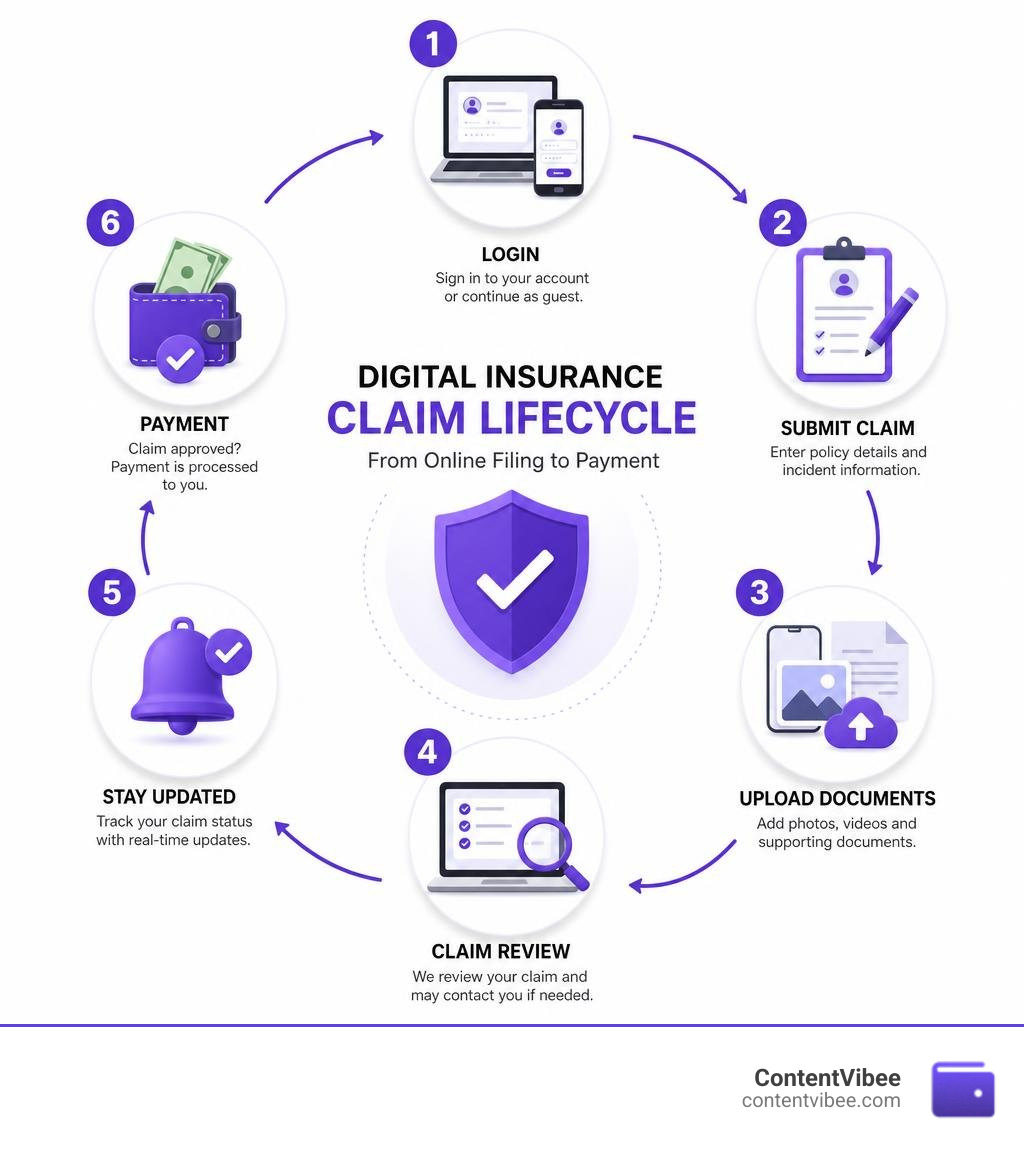
A quick online claim filing process usually looks like this:
- Sign in to your insurance account or select a guest claim option.
- Enter your policy number and the date, location, and details of the loss.
- Add photos, videos, police report details, receipts, or proof of ownership when available.
- Submit the claim and save the claim number.
- Use the online dashboard, email alerts, or app to follow updates from the insurer.
Online filing can be useful after a car crash, storm damage, theft, water leak, or other covered loss. It creates a digital record, lets you send evidence without waiting on hold, and may allow photo-based estimates for simple damage. Still, protect people first, report emergencies to 911 when needed, and take reasonable steps to prevent further property damage.
Pre-Filing Checklist: What You Need Before Starting
Before you sit down at your keyboard or open your smartphone app, taking five minutes to gather your paperwork can turn what feels like a chore into a total breeze. Filing an insurance claim digitally is designed to take between 10 to 15 minutes, but hunting down missing policy numbers mid-form can drag things out.
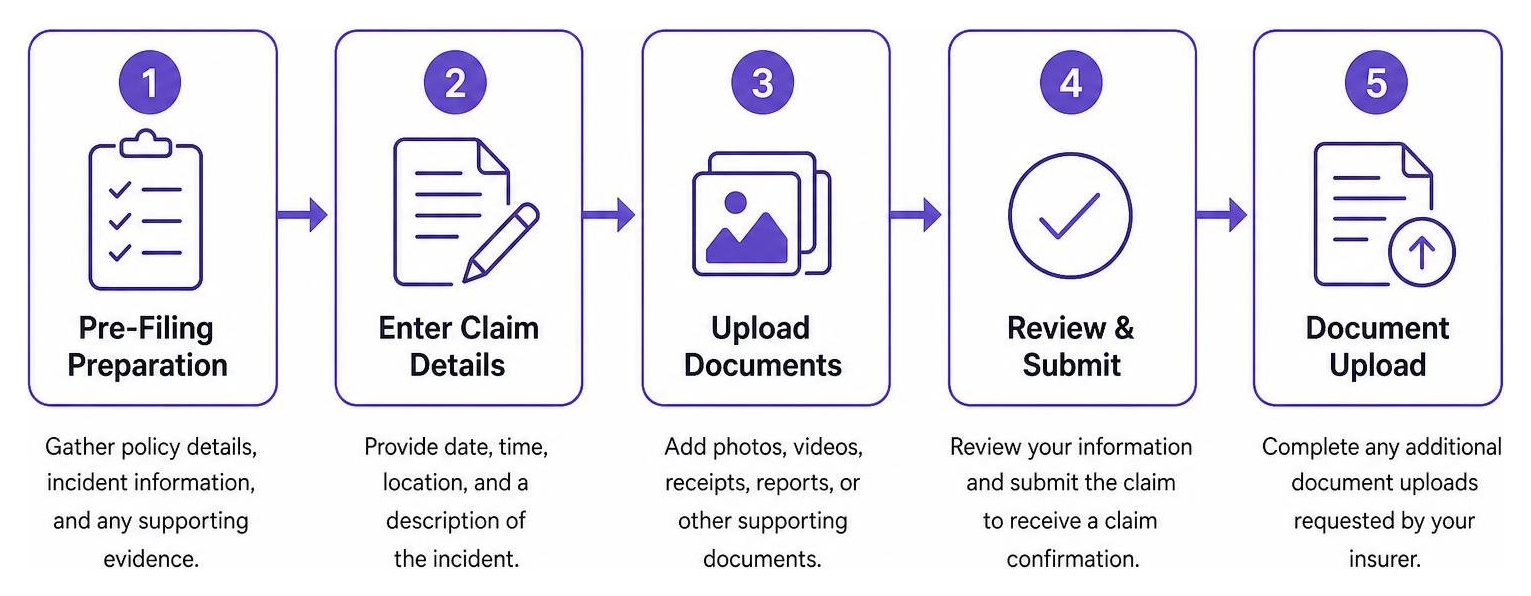
When we prepare to report an incident, we always build a quick pre-filing checklist:
- Policy Information: Your policy number, the primary policyholder’s name, and current contact details.
- Incident Details: The exact date, time, and location where the incident occurred.
- Weather and Context Logs: If filing for storm or property damage, keeping a quick log of local weather conditions (such as hail size or wind speed) provides clear context for your adjuster.
- Preventive Action Records: Evidence that you took steps to stop further loss, such as placing a tarp over a damaged roof or shutting off the main water valve during a pipe burst.
- Interaction Logs: A running record of who you spoke with, including police officers at an accident scene or emergency repair technicians.
Documents Needed to File Insurance Claim Online
Having the right proof uploaded directly during your initial submission speeds up review times significantly. Depending on the type of loss you are reporting, you will want to have digital copies or clear smartphone photos of the following documents ready:
- Official Police Reports: Necessary for auto accidents, vandalism, burglary, or stolen property claims. Keep the officer’s name, badge number, and police report reference number handy.
- Damage Photos and Videos: Wide shots showing the full scope of the property or vehicle damage, alongside close-up shots of specific details.
- Proof of Ownership & Receipts: Itemized receipts, purchase orders, credit card statements, or original appraisals for high-value personal belongings.
- Emergency Repair Bills: Invoices for temporary fixes (like board-up services or emergency plumbing) performed to protect the property from secondary damage.
If you are uploading supplemental documentation after your initial report, utilizing a secure online portal provided by your insurer or consulting official resources like the National Association of Insurance Commissioners ensures your files connect directly to your claim file.
Choosing Between Online Filing and Mobile Apps
Policyholders today generally have two digital options: web browser portals and mobile apps. Both pathways connect directly to your insurer’s claims department, but each serves slightly different needs.
- Web Browser Portals: Desktop claims centers are ideal when you have a stack of scanned PDF documents, multiple itemized inventory lists, or large zip files of property repair estimates.
- Mobile Apps: Smartphone applications excel in immediate, on-the-scene filing. Apps often feature guided camera tools that prompt you to take specific photo angles of auto damage or property destruction.
Mobile apps also allow you to opt into push notifications and text alerts, keeping you updated in real time without forcing you to log into a browser every morning.
How to File Insurance Claim Online: Step-by-Step Process
Filing a claim digitally bypasses the hassle of sitting on hold during peak call hours. Most insurers design their intake engines to wrap up in under 15 minutes. Whether you are using your carrier’s online claims portal or a third-party intake platform, the core intake process remains remarkably smooth.
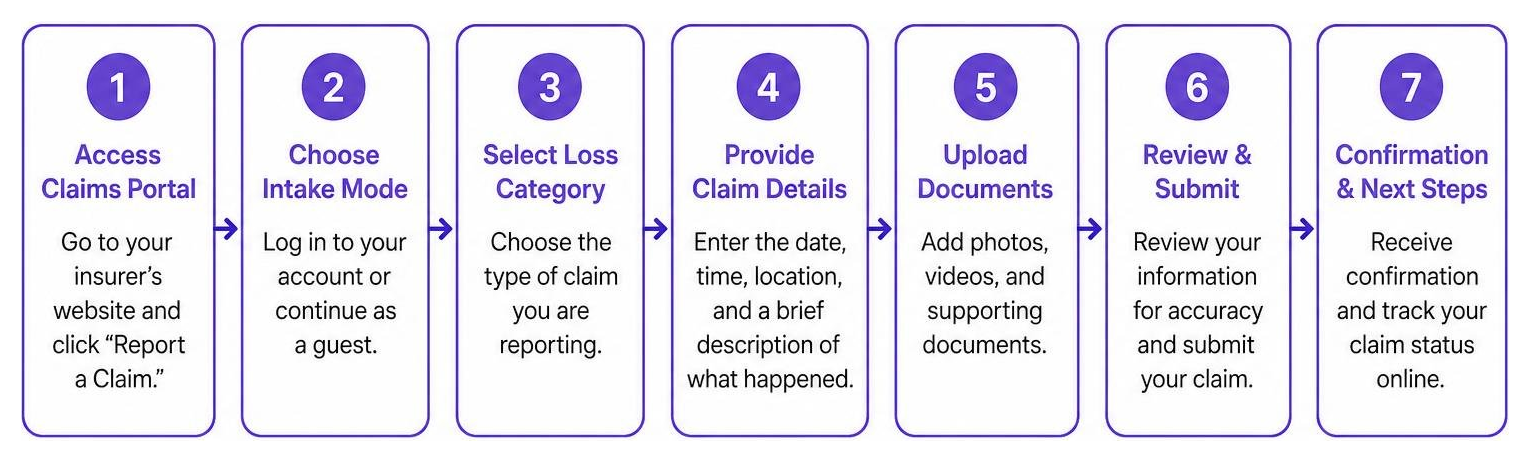
Here is how to navigate the web intake form step by step:
- Access the Claims Portal: Navigate to your carrier’s homepage and click “Report a Claim.”
- Choose Intake Mode: Decide whether to log into your customer account or proceed via a guest intake form (which typically requires your policy number, last name, and date of birth).
- Select Loss Category: Identify whether you are reporting an auto, homeowners, renters, business, or specialty claim.
- Enter Incident Summary: Describe what happened clearly and concisely. Stick strictly to factual details (date, time, location, involved parties).
- Attach Evidence: Upload your photo evidence, police report numbers, and initial repair receipts.
- Select Direct Deposit Options: Input your bank routing and account numbers to receive electronic claim payouts faster than paper checks.
- Review and Submit: Confirm all details are accurate and submit your claim to generate an official tracking number.
Steps to File Insurance Claim Online for Auto Damage
Auto accidents can be stressful, but submitting your claim digitally doesn’t have to be. After ensuring everyone at the scene is safe, law enforcement has been notified, and you have exchanged information with other drivers without admitting fault, you can initiate your claim online.
Many insurance carriers provide streamlined online claims tools where eligible drivers can submit video footage and smartphone photos to utilize photo estimate options.
- Photo Estimates: Instead of waiting days for an adjuster to visit a body shop, guided app features let you upload photos of bumper dings, glass damage, or body scratches. In many cases, photo estimate tools provide an initial estimate and payout for minor damage within 48 hours.
- In-Network vs. Out-of-Network Body Shops: When filing online, you can choose a shop from your carrier’s pre-approved network or pick your own independent mechanic. Network repair shops often include a lifetime workmanship guarantee for as long as you own or lease the vehicle.
- Rental Car Eligibility: During the digital filing process, check your policy coverages for rental reimbursement. (On physical or digital insurance cards, this is often indicated by an ‘R’ in the coverage section).
Submitting Property, Home, and Specialty Insurance Claims
Property damage claims—ranging from roof wind damage to indoor pipe leaks—require careful documentation of both structural loss and personal belongings.
To ensure your home or specialty claim goes smoothly:
- Mitigate Further Damage: Insurers expect policyholders to prevent secondary damage. Tarp leaking roofs, turn off broken water mains, or board up broken windows immediately. Save every receipt for emergency supplies.
- Hold Off on Permanent Repairs: Never execute permanent structural repairs until an adjuster has physically evaluated the property or provided explicit written authorization.
- Specialty Policies: If filing for pet insurance, life insurance, or commercial small business property, specialized portals guide you through role-based forms (insured member, third-party claimant, or business manager) tailored to specific policy terms.
What Happens After Submission: Tracking, Timelines, and Payouts
Once you hit “Submit,” your digital claim transitions from intake to evaluation. Understanding this backend workflow helps manage expectations and reduces anxiety while waiting for your reimbursement.
| Insurance Type | Average Online Filing Time | Initial Decision Notification | Typical Payout Window |
|---|---|---|---|
| Auto (Minor Damage / Photo Estimate) | 10–15 Minutes | 24 to 48 Hours | 2 to 5 Business Days |
| Auto (Major Collision / In-Person Inspection) | 10–15 Minutes | 3 to 7 Days | 7 to 10 Business Days |
| Homeowners / Property Damage | 10–15 Minutes | 5 to 10 Days | 7 to 14 Business Days |
| Pet Insurance Claim | 5–10 Minutes | 3 to 7 Days | 5 to 7 Business Days |
| USPS Mail Coverage Claim | 10 Minutes | 5 to 10 Days | 7 to 10 Business Days |
Tracking Claim Status Online and via SMS
Gone are the days of calling your agent every morning for a status update. Modern digital claims systems allow you to monitor progress in real time.
By utilizing your carrier’s online dashboard tools, policyholders can view their assigned adjuster’s contact info, track repair shop progress, and upload additional documents seamlessly. Many carriers also offer SMS text tracking—allowing you to text shortcodes (such as texting CLAIMS to 252467 on supported networks) or opt into automated email notifications whenever your claim moves to a new stage.
Claim Decision and Payout Timelines
After your claim is submitted, it enters the review phase:
- Adjuster Assignment: An adjuster reviews the loss details, verifies active coverage, and checks deductible limits.
- Damage Assessment: Estimates are calculated via photo tools or in-person field inspections.
- Decision Notice: Formal approval, partial approval, or denial decisions are usually communicated within 5 to 10 days.
- Payment Processing: Once approved, claims payments minus your deductible are issued. Direct deposit funds typically arrive in your bank account within 7 to 10 business days (or as fast as 48 hours for photo-estimated auto dings).
Handling Claim Denials, Appeals, and Partial Payments

Discovering that your claim was partially paid or denied entirely can feel frustrating, but a denial is not necessarily the end of the road. Insurers are legally required to provide a written explanation detailing the exact policy exclusions or missing documentation that led to their decision.
Common reasons for claim adjustments or denials include:
- Exceeded policy liability limits.
- Uncovered cause of loss (e.g., standard flood damage excluded on a basic homeowners policy).
- Insufficient proof of value or lack of photo evidence.
- Damage cost falling below your chosen policy deductible.
How to File an Appeal Within 30 Days
If you disagree with an insurer’s decision, you generally have a strict 30-day window from the date you receive your decision letter to file a formal appeal.
To build a strong appeal:
- Review the Explanation Letter: Pinpoint the exact reason cited for the denial.
- Gather Supplemental Evidence: Obtain new contractor estimates, expert engineering reports, or clearer historical photos proving item ownership.
- Submit First Formal Appeal: Draft an appeal focusing strictly on addressing the denial grounds. Submit it through your online portal to maintain a digital paper trail.
- Follow Up on Secondary Appeals: If your first appeal is rejected, many administrative processes allow a second and final appeal within an additional 30 days.
For detailed strategies on overturning vehicle claim rejections, read our comprehensive guide on The Ultimate Guide to Handling an Auto Insurance Claim Denial.
Calculating Expected Payouts and Resolving Disagreements
Your final claim check reflects the total evaluated loss minus your agreed policy deductible.
$$\text{Final Payout} = \text{Total Evaluated Loss} – \text{Policy Deductible}$$
For example, if a storm causes $4,500 in roof damage and your property deductible is $1,000, your direct claim payout will be $3,500.
Insurers evaluate personal items based on Actual Cash Value (ACV) unless you hold a Replacement Cost Value (RCV) policy rider or Personal Articles endorsement. If you suspect an insurer’s valuation of your loss is incorrect, use our Settlement Calculator Estimate Your Claim Amount tool to estimate your expected settlement before negotiating with your adjuster.
Benefits of Online Claims vs. Phone Reporting

While traditional 24/7 phone intake hotlines remain vital emergency options, digital submission offers significant advantages for standard losses.
- Zero Wait Times: Skip phone holds during regional weather emergencies when call centers experience high traffic.
- 24/7 Flexibility: Start, pause, and submit forms on digital claim platforms at any time of day or night.
- Clear Digital Records: Uploading documents creates a time-stamped paper trail of every photo, message, and bill sent to your adjuster.
- Fast Photo Estimates: App-based photo submissions enable remote damage calculations without waiting days for an adjuster to schedule an in-person visit.
If you ever need to transition from digital management to speaking directly with a representative, bookmarking resource guides like The General Insurance Claims Phone Number Your Quick Guide to Filing a Claim and checking The General Claims Department Hours and Best Times to Call ensures you get connected fast.
Frequently Asked Questions About Online Claims
How long does it take to file an insurance claim online?
Completing a digital claim form generally takes 10 to 15 minutes. If you have gathered your policy details, police report numbers, and photos beforehand, intake forms can be completed in under 10 minutes.
Can I upload photos and video evidence when filing online?
Yes. Modern online claims portals and mobile apps allow you to attach smartphone photos, digital repair estimates, receipts, and video clips directly to your claim file. Some carriers even use these uploads to issue auto repair estimates within 48 hours.
What should I do if my claim is partially paid or denied?
Carefully review the explanation letter from your carrier to understand why coverage was reduced or denied. Gather additional supporting evidence (such as contractor reports or purchase receipts) and submit a formal appeal online within 30 days of receiving the decision.
Conclusion
Learning how to file insurance claim online gives you full control over the recovery process. By preparing your documentation beforehand, uploading clear evidence, and leveraging mobile app photo estimation tools, you can transform what used to be a stressful ordeal into a smooth 10-to-15-minute digital task.
Remember to track your claim progress through your online dashboard, keep records of all communications, and keep an eye on important deadlines if you need to submit additional evidence or file an appeal within 30 days.
When you need reliable advice on navigating complex policy claims, auto coverage comparisons, or health and dental reimbursement challenges, explore our related financial guides:
- How to Resolve Unpaid Dental Claim in 5 Easy Steps
- How to Appeal a Dental Insurance Denial and Get Your Money Back
- Guide to Cheap Auto Insurance Quotes
- Compare Car Insurance Quotes
- Auto Insurance Quotes California
- Auto Insurance Quotes NC
For more step-by-step guides on managing your policy coverage and navigating claims smoothly, check out our central hub at The General Insurance Claims Phone Number Your Quick Guide to Filing a Claim.


